
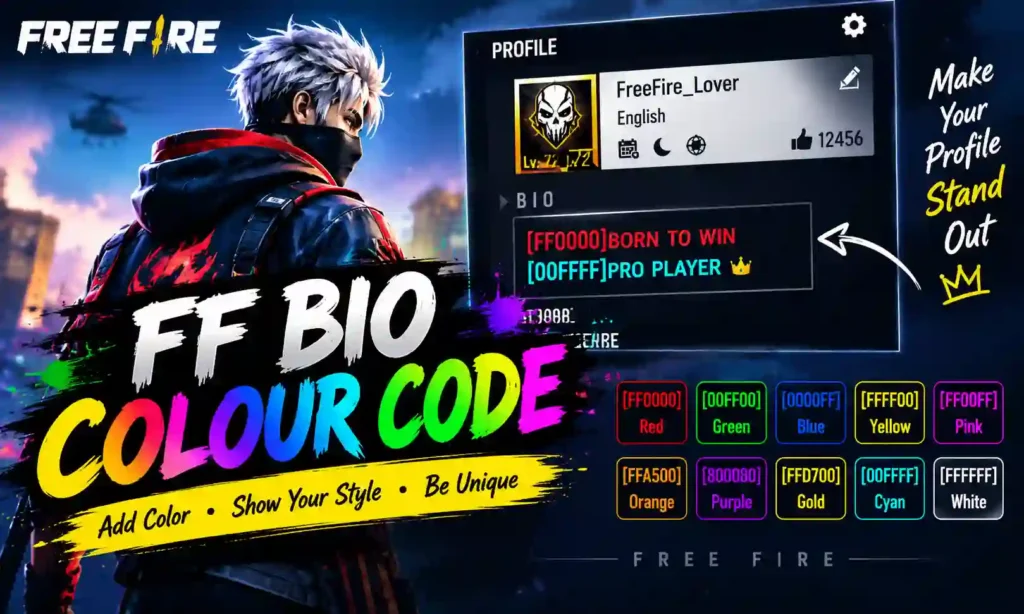
Free Fire is not just about winning matches, collecting gun skins, or unlocking new characters. Players also enjoy customizing their profiles to show their gaming personality. One popular way to make a profile stand out is by using FF Bio Colour Codes.
Follow these Codes players can use these codes to insert colourful text into their Free Fire bio or signature to make it more attractive than plain text. Be it a red attitude bio, a golden pro-player signature, or a multi-colour gaming style, the colour code can make the profile look unique.
In this guide, you will find out what FF bio colour codes are, how to apply them, some popular colour codes, examples of bios you can copy and paste, and straightforward methods to fix common issues.
What Is an FF Bio Colour Code?
An FF Bio Colour Code is a text code that you can try out in the signature or bio section of your Free Fire profile. These codes typically include hex colour values in brackets.
Like in [FF0000] which means “red” in the usual hexadecimal colour notation. When a Free Fire compatible interface detects this code, the rest of the text can appear in red color.
Example:
[FF0000]VIP PLAYER
Popular FF Bio Colour Codes List
Here are some commonly used hexadecimal colour codes you can try when customizing your Free Fire bio.
| Colour Name | Hex Colour Code | Example |
|---|---|---|
| Red | [FF0000] | [FF0000]KING |
| Green | [00FF00] | [00FF00]GAMER |
| Blue | [0000FF] | [0000FF]PRO PLAYER |
| Yellow | [FFFF00] | [FFFF00]CHAMPION |
| Cyan | [00FFFF] | [00FFFF]SQUAD LEADER |
| Magenta | [FF00FF] | [FF00FF]LEGEND |
| Orange | [FFA500] | [FFA500]HEADSHOT |
| Purple | [800080] | [800080]DARK KING |
| Gold | [FFD700] | [FFD700]ROYAL PLAYER |
| White | [FFFFFF] | [FFFFFF]FREE FIRE |
| Black | [000000] | [000000]ATTITUDE |
| Silver | [C0C0C0] | [C0C0C0]ELITE GAMER |
| Pink | [FFC0CB] | [FFC0CB]SWEET PLAYER |
| Sky Blue | [87CEEB] | [87CEEB]BOOYAH |
How to Use FF Bio Colour Codes in Free Fire
Adding colour codes to your profile is straightforward if your game version supports them. Follow these steps to try a coloured bio.
- Open Free Fire or Free Fire MAX on your device.
- Go to the main lobby and tap your profile picture.
- Find the profile editing option.
- Open the Signature or Bio field, if available.
- Copy a colour code from the list above.
- Paste the code before the text you want to style. For example, enter [FF0000]PRO GAMER.
- Save the changes and check how your profile appears.
How to Create a Multi-Colour FF Bio
You can try combining different colour codes to give separate words different colours. Place a new code before each section of text.
Example:
[FF0000]KING [FFFF00]OF [00FF00]FREE FIRE
The intended result is:
- KING — red
- OF — yellow
- FREE FIRE — green
FF Bio Bold and Stylish Text Codes
Some Free Fire bio guides also use formatting tags such as [b], [i], and [u] for bold, italic, and underlined text. Support for these tags may differ, so treat them as formats to test rather than guaranteed features.
| Style | Example Code |
|---|---|
| Bold | [b][FFD700]LEGEND |
| Italic | [i][00FFFF]PRO PLAYER |
| Underlined | [u][FF0000]HEADSHOT KING |
Best FF Bio Colour Code Templates to Copy
Want a ready-made Free Fire bio? Try these examples and customise the words to match your gaming style.
1. Red Attitude Bio
[FF0000]BORN TO WIN
A simple option for players who prefer a bold, competitive profile.
2. Golden Pro Gamer Bio
[FFD700]PRO PLAYER
Use this template to create a gold-themed gaming signature.
3. Multi-Colour Free Fire Bio
[FF0000]KING [FFFF00]OF [00FF00]BOOYAH
This example combines three colour codes for a more colourful look.
4. Squad Leader Bio
[00FFFF]SQUAD LEADER [FF00FF]ONE SHOT
A team-focused option for players who enjoy squad matches.
5. Minimal Gaming Bio
[00FF00]PLAY SMART
This short template works well for players who prefer simple profile text.
6. Royal Gaming Bio
[FFD700]ROYAL [FF0000]GAMER
A two-colour example for a gold-and-red theme.
Why Are FF Bio Colour Codes Not Working?
Sometimes a colour code may not produce the expected result. Here are a few possible reasons and things to check.
- The code appears as plain text: The game may not recognise that particular formatting syntax. Try a basic code such as [FF0000] and check the saved profile.
- The colour does not change: Make sure the code is typed correctly, including the square brackets and all six hexadecimal characters.
- Multi-colour text does not work: Your game version may not support multiple colour codes in one signature. Test a single-colour example first.
- Styling tags are ignored: Tags such as [b], [i], and [u] may not be supported in your current interface.
- The bio cannot be saved: Check the game’s current signature length limit and remove unnecessary spaces or symbols if needed.
Tips for Making Your Free Fire Bio Look Better
A stylish bio does not need dozens of codes. A few simple choices can make your profile look cleaner and more memorable.
- Keep the text short: Short phrases are easier to read on a mobile screen.
- Choose colours carefully: Red, gold, cyan, and green are popular choices for gaming-themed text.
- Use meaningful words: Phrases such as “Pro Gamer,” “Squad Leader,” and “Play Smart” make your profile easy to understand.
- Avoid unnecessary symbols: Too many special characters can make the bio look cluttered.
- Test before saving permanently: Check whether your chosen code works in your current version of the game.
Conclusion
Free Fire FF Bio Colour Codes Free Fire players can use these FF Bio Colour Codes to explore many more colours and creative signature signatures on your profile. These include many colour combinations that can be explored, such as red attitude text, golden gaming lines, multi, colour, templates, and many more.
Test with a basic code like [FF0000]PRO GAMER in your profile and see what you get. Try other colours if the style is working on that game version, the same format may not always work everywhere so test them.
A quality Free Fire bio is one that defines you, remains simple to read, and gives your profile a unique gaming character.
Frequently Asked Questions
What is the FF Bio Colour Code?
FF Bio Colour Code refers to a formatting style that uses hexadecimal colour values in square brackets to try to display coloured text in a Free Fire profile signature.
Which code is used for red text in Free Fire?
[FF0000] represents red in the standard hexadecimal colour system. Whether it displays coloured text in your Free Fire bio depends on the game’s formatting support.
Can I use different colours in one FF bio?
You can try placing a different colour code before each word or phrase. For example, [FF0000]KING [00FF00]PLAYER. The result depends on whether your game version supports the format.
Can FF bio colour codes change my in-game nickname?
These examples are intended for experimenting with profile bio or signature text. They do not guarantee colour changes to your in-game nickname.
Are FF bio colour codes safe to use?
Typing a text code into the game’s own profile editor does not require installing an extra application. However, do not assume that every third-party tool is safe or officially supported by Garena.
Why does my FF bio show the code instead of coloured text?
Your current game version may not recognise the code format. Check the spelling and brackets, try a basic example, and remove the code if it continues to appear as plain text.
Also read about: Senjata Free Fire: Best Weapons, Stats, and Pro Tips to Win in 2026