
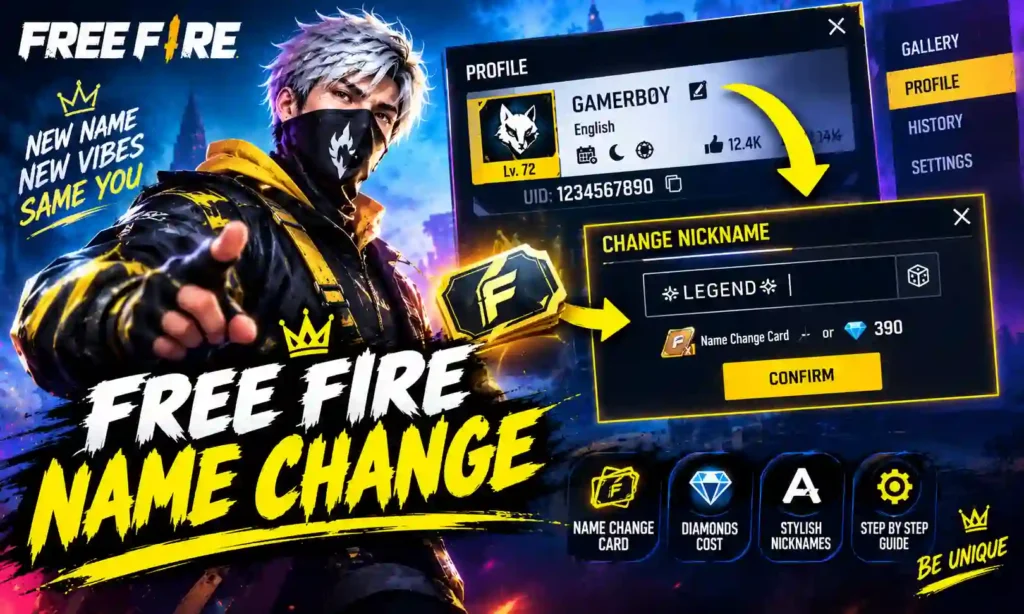
In Free Fire, your Gamertag is the name of your gaming persona. It’s also how others will identify you during matches and in your guild. If you are planning to make a new exciting identity, bring some fancy symbols, get different fonts or convert your old nickname to a brand new cool name, first learn how to change Free Fire Name in-game and here’s how you can do that.
How to change your Free Fire name? Fortunately, Free Fire permits you to alter your in-game name. To do so though you may need to use a Name Change Card or diamonds, according to what options are available in the game. In this guide, you will discover how to change your Free Fire name, stylish nicknames, symbols, and more.
What Is Free Fire Name Change?
Changing your Free Fire name involves updating your existing in-game nickname to a different one. This nickname is displayed on your player profile and can also be seen by teammates, opponents, and other players.
Some players alter their names to make their accounts more professional, unique, or fun. Others like using shorter names, decorative text, symbols, or styles to fit their gaming group. A nice Free Fire name must be easy to identify, eye-catching, and must respect the game restrictions.
How to Change Your Name in Free Fire
Follow these steps to change your in-game name:
- Open Garena Free Fire or Free Fire MAX on your device.
- Log in to your gaming account.
- Tap your profile icon in the top-left corner of the main screen.
- Find the edit or pencil icon beside your current nickname.
- Tap the nickname field to open the name-editing option.
- Enter your preferred new name. You can prepare a stylish nickname beforehand using symbols or decorative characters.
- Check the displayed cost and available payment method.
- Confirm the change if you have the required item or diamonds.
Free Fire Name Change Cost in 2026
The cost of changing your Free Fire name depends on the option displayed in your game. Players may be able to use diamonds or a Name Change Card. Different guides report different prices, so the in-game confirmation screen is the safest place to check the current cost.
| Name Change Method | What You Need | Important Detail |
|---|---|---|
| Direct name change | Diamonds | Check the price shown in your game. |
| Name Change Card | One available card | Use the card if the rename screen offers this option. |
| Event reward | Depends on the event | Limited-time events may offer a card or related reward. |
| In-game store | Diamonds or other listed resources | Availability and cost may vary by region and game update. |
What Is a Free Fire Name Change Card?
A Free Fire Name Change Card is an in-game item that allows eligible players to replace their current nickname without paying the direct diamond cost for that change.
Depending on the current game version, players may find name-change items in the store or receive them through special events and rewards. Availability is not guaranteed, so check the game’s current menus before spending resources.
How to Use a Name Change Card
- Open Free Fire and visit your profile.
- Tap the edit icon beside your current nickname.
- Enter the new name you want to use.
- Check whether the Name Change Card option is available.
- Select the card and confirm the change.
How to Change Your Free Fire Name for Free
If you want to change your Free Fire name without spending diamonds, look for a Name Change Card or an event that provides one as a reward.
Here are some options to check:
- Limited-time events: Review the event section for rewards that include a name-change item.
- Guild-related rewards: Check the guild store to see whether a card is available and what resources it requires.
- Special promotions: Look for official in-game campaigns that offer relevant rewards.
- Your inventory: Check whether you already own a Name Change Card before buying anything.
Stylish Free Fire Names to Copy
A stylish nickname can help your profile stand out. You can choose a simple gaming name, add decorative symbols, or use a name that reflects your personality.
Here are some examples to try:
| Style | Free Fire Name |
|---|---|
| Pro Gamer | 亗PRO亗 |
| Killer Style | 乂KILLER乂 |
| Royal Style | ♛KING♛ |
| Shadow Style | SHADOW々 |
| Sniper Style | 亗SNIPER |
| Attitude Style | BADメBOY |
| Fire Style | FIRE々X |
| Ninja Style | 乂NINJA乂 |
| Solo Player | SOLO亗 |
| Dark Style | DARKメSOUL |
| Warrior Style | 亗WARRIOR |
| Gaming Style | PRO々MAX |
How to Create Your Own Stylish Free Fire Name
If you prefer a personal nickname rather than copying an existing one, follow these suggestions.
1. Start With a Short Word
Choose a word connected to your gaming identity, such as King, Shadow, Ninja, Hunter, or Warrior. Short names are generally easier to remember.
2. Add Simple Symbols
You can experiment with symbols such as 亗, 乂, 々, and ♛. However, not every special character will work correctly on every device or in every game version. Garena itself advises caution with special characters because their appearance can vary across devices.
3. Keep the Name Readable
Adding too many symbols can make a nickname difficult to recognize. A simple combination of a word and one or two decorative elements may look cleaner than a name filled with unusual characters.
4. Check the Name Before Paying
Paste your proposed nickname into the in-game field. Review the preview and any error messages before completing the transaction.
Free Fire Name Change: Common Problems and Solutions
Sometimes the game does not accept a new nickname or displays it differently than expected. These are some practical steps you can try.
| Problem | Possible Solution |
|---|---|
| The game rejects your nickname | Try a simpler name and remove unusual symbols. |
| You do not have enough diamonds | Check your balance or look for an available Name Change Card. |
| Your special symbols appear incorrectly | Replace unsupported characters with ordinary letters or symbols from your keyboard. |
| You cannot find the edit option | Open your player profile and look beside your current nickname. |
| The name change costs more than expected | Review the current price and payment options on the confirmation screen. |
| Your preferred name does not work | Try a different variation and check the game’s response. |
Important Tips Before Changing Your Free Fire Name
Before using diamonds or a Name Change Card, keep these points in mind:
- Choose a nickname you will be happy to use for a while.
- Double-check spelling, capitalization, and symbols.
- Check the name preview before confirming the transaction.
- Avoid offensive names or names that violate the game’s rules.
- Do not share your password or account verification codes with name-change websites.
- Use the in-game rename feature rather than unofficial modification tools.
- Check the current cost instead of relying on old tutorials.
Conclusion
Free Fire name change Due to the Free Fire name change feature you will be able to change your ID with a fresh name, a fresh account name or a combination of special characters and text with a new name change. To change a name, access your profile, tap on the edit option on your current nickname, enter the name you want, and then confirm through in-game confirmation.
Review the displayed amount before proceeding with the change, test the symbols you want to use and ensure spelling is accurate. No matter if you want a professional-sounding name for gaming or your gaming & YouTube nickname, selecting a name, which is easy to read and fits your persona makes your Free Fire account more personalized.
Frequently Asked Questions
How do I change my name in Free Fire?
Open your player profile, tap the edit icon next to your current nickname, enter the new name, and confirm using the available payment option or Name Change Card.
How many diamonds are required for a Free Fire name change?
The required number of diamonds can depend on the available rename option and current game version. Check the confirmation screen for the exact price before proceeding.
Can I change my Free Fire name without diamonds?
Yes, if you have a Name Change Card that the game accepts for the rename. You can also check official events and rewards for opportunities to obtain one.
Can I use stylish symbols in my Free Fire name?
Some symbols may work, while others may be rejected or display incorrectly. Test your chosen name in the game’s nickname field before confirming.
Will changing my name delete my Free Fire account?
Changing your nickname is not the same as deleting your account. The rename feature updates your displayed in-game name.
Can two Free Fire players have the same name?
If your preferred nickname is not accepted, try a different variation. The game’s own validation message will indicate whether the name can be used.
How often can I change my Free Fire name?
Each rename requires the payment method or item offered by the game. Check the current in-game rules for any applicable restrictions.
Is it safe to use a third-party Free Fire name changer?
Be cautious with unofficial name-changing websites and apps, particularly those asking for your account password, verification code, or other private information. Use the official in-game rename feature instead.
Also read about: TLS Warrior UID: Free Fire ID, Real Name, Stats, and Biography