
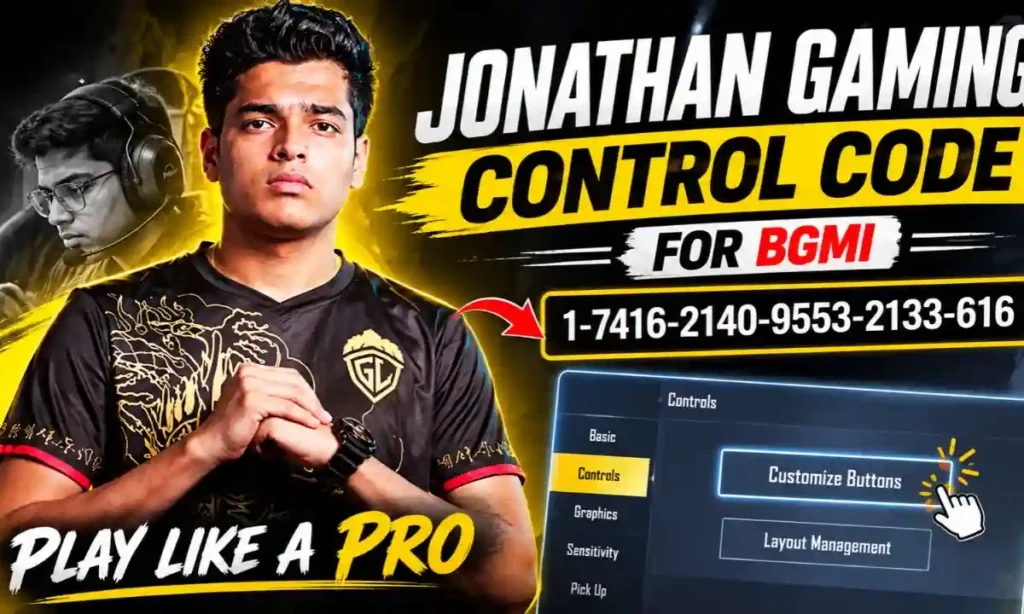
Jonathan Gaming, whose real name is Jonathan Jude Amaral, is one of the most recognised professional esports players in India’s BGMI community. He is famous for his aggressive gameplay, incredible reflexes, accurate aim and impressive close-range combat skills. His ability to control weapon recoil and eliminate opponents quickly has made him an inspiration for millions of mobile gaming fans.
One notable feature of Jonathan’s gameplay is his use of a traditional two-thumb control layout paired with an advanced gyroscope configuration. Although many professional players opt for three-finger or four-finger claw controls, Jonathan has shown that a well-practiced thumb layout combined with precise gyro movements can achieve excellent performance.
If you are looking for the Jonathan Gaming Control Code, HUD layout, sensitivity settings then here is the code you have been searching for. We have listed the code settings tips that you need to set up BGMI or PUBG Mobile.
Who Is Jonathan Gaming and Why Are His Controls Popular?
Jonathan Gaming is the name of the gaming character of Jonathan Jude Amaral. He is an Indian professional gamer who has showcased his gaming talents in PUBG Mobile and the Battlegrounds Mobile India (BGMI).
He was well-liked for his aggressive entry-fragging style, excellent recoil management and lightning-quick reactions. His style of play includes quick target switching, precise sprays and fearless close-quarters combat.
Jonathan’s control Config many people notice Jonathan’s control configuration in that he normally employs a two-thumb setup with an Always-On Gyroscope. Together, the two thumb setup and “tilts” in the direction of each scan provide a method for controlling movement and aiming with the thumbs, while making minute adjustments through tilt. Many pro players have used his build, leading to it being a widely sought-after HUD by anyone wanting to try a pro HUD.
Jonathan Gaming Control Code for BGMI
BGMI control code for Jonathan Gaming Based on the reports, Jonathan Gaming’s BGMI control code is 1-7416-2140-9553-2133-616. This code is based on his real-life two thumb control layout, which is widely used because of his quick pace, deadly aim, and agressive style of play. You can input it by navigating to Controls and Layout Management section in BGMI, and experiment with Jonathan Gaming’s button position.
How to Apply Jonathan Gaming Control Code in BGMI
Importing a shared control layout is relatively simple. Follow these steps to try Jonathan’s reported HUD:
- Open BGMI on your smartphone.
- Go to the main lobby and tap Settings.
- Select the Controls section.
- Open Customize Buttons.
- Choose the layout slot you want to modify, such as Layout 1.
- Find the Layout Management or Search option.
- Enter the control code: 1-7416-2140-9553-2133-616.
- Tap Preview to check the button positions.
- Select Upload to Cloud, Use Layout or the equivalent option shown in your game.
- Save the layout and test it in Training Grounds.
Jonathan Gaming Sensitivity Settings in BGMI
A control layout determines where your buttons appear, while sensitivity settings control how quickly your camera and aim respond to finger movements or device tilts.
Jonathan is known for relying heavily on gyroscope movement to manage recoil and track opponents. The following values are approximate ranges reported across gaming guides. They should be treated as reference settings rather than a guaranteed official configuration.
1. Camera Sensitivity (Free Look)
Free Look sensitivity controls how quickly you can look around without changing your character’s direction.
| Setting | Reported Sensitivity |
|---|---|
| TPP Character | 100%–110% |
| Vehicle | 100%–110% |
| FPP Character | 100%–101% |
| Camera (Parachuting) | 100%–110% |
2. Camera Sensitivity (General)
Camera sensitivity affects how quickly the camera moves when you swipe the screen. It plays an important role in target tracking and changing your aim direction.
| Scope / Setting | Reported Sensitivity |
|---|---|
| TPP No Scope | 110%–120% |
| FPP No Scope | 104%–110% |
| Red Dot, Holographic, Iron Sight | 34%–88% |
| 2x Scope | 30%–88% |
| 3x Scope | 24% |
| 4x Scope | 24% |
3. Gyroscope Sensitivity
Gyroscope sensitivity is one of the most important parts of Jonathan’s reported gameplay style. It allows players to control their aim by physically tilting the phone instead of relying entirely on finger movement.
| Scope / Setting | Reported Sensitivity |
|---|---|
| TPP No Scope | 300% |
| FPP No Scope | 300% |
| Red Dot, Holographic | 300% |
| 2x Scope | 300% |
| 3x Scope | 200%–240% |
| 4x Scope | 260% |
| 6x Scope | 100%–240% |
| 8x Scope | 85% |
Why Does Jonathan Gaming Use Gyroscope?
Gyroscope controls allow players to move their aim by tilting the smartphone. This can make recoil management and target tracking more flexible, especially during fast fights.
Some important advantages include:
- Recoil Control: Tilting the device helps pull the aim down while firing.
- Faster Tracking: Players can follow moving opponents with small physical movements.
- Close-Range Control: Gyroscope movement can help with quick aim adjustments.
- Reduced Dependence on Swiping: Players can combine finger movement with device tilts.
- More Precise Adjustments: Small movements can help fine-tune the crosshair position.
Tips for Mastering Jonathan Gaming’s Control Layout
Simply importing a professional player’s control code does not guarantee professional-level gameplay. You need to practise regularly and adjust the layout according to your device and comfort.
1. Practise in Training Grounds
Spend around 20–30 minutes practising sprays, recoil control, target switching and movement. Training mode helps you understand how the new HUD feels before entering competitive matches.
2. Keep Gyroscope on Always On
Jonathan’s traditional gameplay style is strongly associated with Always-On Gyroscope controls. If you are comfortable with gyro aiming, try this mode and practise controlling recoil through device movement. Make sure your phone has a reliable gyroscope sensor. Poor sensor performance can make aiming feel unstable.
3. Adjust Sensitivity Gradually
Do not change every sensitivity value at once. Start with the reported settings, test them in Training Grounds and make small adjustments until your aim feels comfortable.
4. Optimise Your Device Performance
A stable frame rate and responsive touchscreen can make a difference in fast-paced matches. Use the highest stable graphics frame-rate option supported by your device rather than forcing settings that cause overheating or lag.
5. Develop Muscle Memory
Keep your HUD reasonably consistent. Repeatedly changing button positions can make it harder to build muscle memory and react quickly during fights.
6. Practise Close-Range Combat
Jonathan is especially admired for his aggressive close-range gameplay. Practise hip-fire, shotgun aim, movement and quick target switching to improve your fighting skills.
Two-Thumb Controls vs Three-Finger and Four-Finger Layouts
Different players use different HUD styles depending on their comfort and experience. Jonathan’s traditional two-thumb approach is one example, but other layouts can also offer useful advantages.
| Control Layout | Fingers Used | Main Advantage |
|---|---|---|
| Two-Thumb | Two thumbs | Simple and comfortable |
| Three-Finger | Two thumbs and one index finger | More simultaneous actions |
| Four-Finger | Two thumbs and two index fingers | Greater button control |
| Five-Finger | Five fingers | Advanced customisation |
Why Is Jonathan Gaming’s Control Code Not Working?
Sometimes players enter a shared code but cannot import the layout. This does not necessarily mean they are following the wrong steps.
Common reasons include:
- Incorrect Code: One missing or misplaced digit can cause an error.
- Old Layout: The original player may have changed or replaced the shared HUD.
- Unavailable Code: The shared configuration may no longer be accessible.
- Game Version Differences: Updates can change how layout sharing works.
- Import Problems: A temporary connection or server issue may prevent the layout from loading.
Are Jonathan Gaming’s Sensitivity Settings Good for Beginners?
The values found by him for the sensitivity of the fans give guidelines, but do not blindly copy all of them. If you are not familiar with gyro aiming, the sensitivity of 300% will feel difficult. Begin with low sensitivity and comfortable settings, and work on the basic recoil control before gradually increasing as you get more accurate.
Final Thoughts
BGMI players can refer to the Jonathan Gaming Control Code to test out a professional player’s HUD layout. Jonathan also uses a traditional two-thumb layout with high gyroscope sensibilities, which has motivated many BGMI players to boost their gunplay and recoil control skills.
You can attempt the said code 1-7416-2140-9553-2133-616 in the layout management option of BGMI but don’t expect it to work all the time. Remember that professional environment isn’t a shortcut to success. Regular play, responsive controls and steady device performance matter as much as the number itself.
Frequently Asked Questions
What is Jonathan Gaming’s BGMI control code?
A previously reported Jonathan Gaming two-thumb control code is 1-7416-2140-9553-2133-616. Its current validity is not guaranteed.
Does Jonathan Gaming use two-thumb controls?
Jonathan is traditionally known for using a two-thumb control layout combined with gyroscope aiming.
What is Jonathan Gaming’s gyroscope sensitivity?
Published guides report values of around 300% for TPP/FPP No Scope, Red Dot and 2x Scope. Other scopes have different reported ranges.
Does Jonathan Gaming use Always-On Gyroscope?
His traditional gameplay setup is associated with Always-On Gyroscope, which helps him control aim and recoil through device movement.
Can beginners use Jonathan Gaming’s control code?
Yes. Beginners can try the layout, but they should practise in Training Grounds and adjust button positions according to their comfort.
Why is Jonathan Gaming’s control code not working?
The code may be outdated, unavailable or entered incorrectly. Check the digits and try importing it again through the Controls section.
Is Jonathan’s control code the same as his sensitivity code?
No. A control code imports the HUD button arrangement, whereas a sensitivity code is used to import camera, ADS or gyroscope sensitivity settings.
Can I use Jonathan Gaming’s controls in PUBG Mobile?
BGMI and PUBG Mobile have similar control systems, but a BGMI share code is not guaranteed to work in PUBG Mobile. Compatibility depends on the game’s layout-sharing system.
Also read about: Jonathan Net Worth: Income, Gaming Career, Sponsorships and Lifestyle